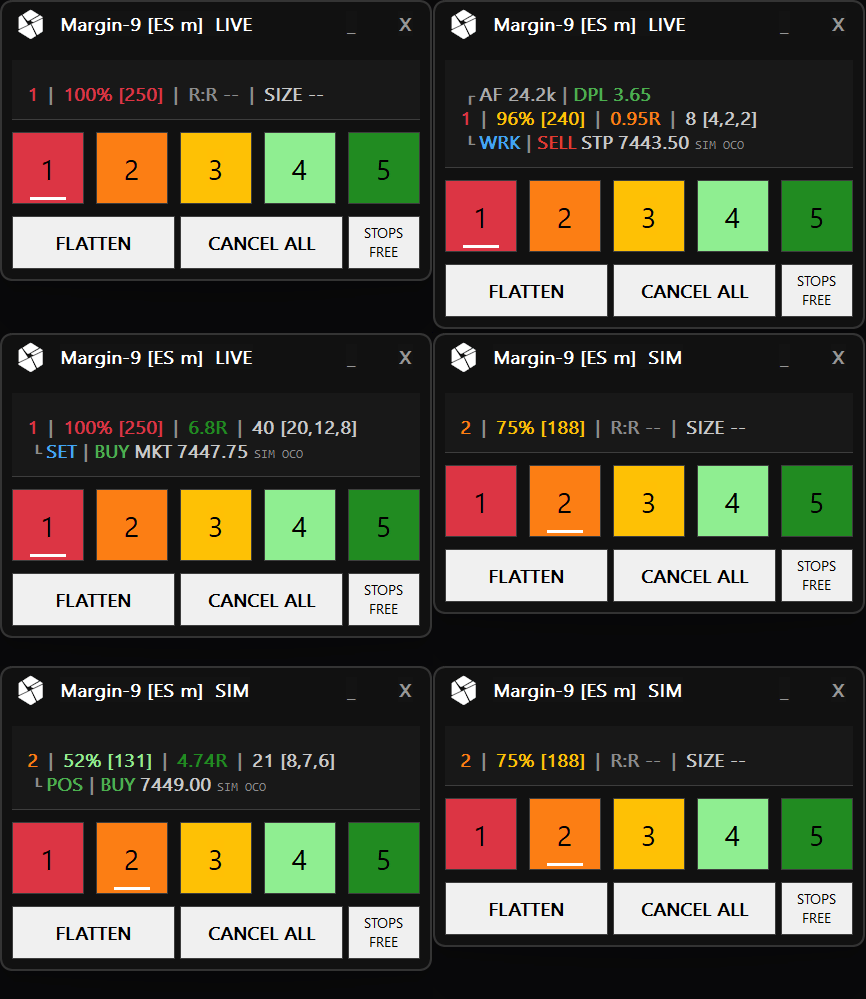
Margin-9 order panel in action — risk profiles, position sizing and one-click management
[Sierra Chart]

Margin-9*v3.4.0
Our Risk Calibration Tool

Professional position sizing & risk management for Sierra Chart. Eliminate manual calculations and emotional decision-making.

On a mobile device? Send this page to your workstation.

Core Principle

Constant risk not constant contracts

Your risk per trade should remain the same regardless of stop distance. Margin-9 calculates contract quantity automatically so your dollar exposure stays consistent.

Tight Stop5 pts
Wide Stop20 pts

Constant Risk

Stop distance changes. Position size adapts. Dollar risk remains locked.

[The Problem]

Manual sizing creates inconsistent risk

Trading the same number of contracts every time guarantees inconsistent risk exposure. Standard tools don't address this structural gap.

ProblemConsequence
Fixed contract sizingInconsistent risk exposure across trades
Manual position calculationErrors under live market pressure
Disconnected calculatorsGap between analysis and execution
No risk profile switchingSame approach for all market conditions

These gaps compound over time, eroding edge and capital

[How It Works]

Automatic calculation in real-time

The study monitors your orders, detects stop distance, and modifies position size instantly. No manual intervention required.

1

Place Entry Order

Hold-key + click on the chart, or place your own entry/stop pair

2

Automatic Detection

Study identifies order structure and stop distance

3

Position Calculation

Contract quantity computed from risk parameters

4

Order Modification

Entry order adjusted to calculated quantity

5

TP Distribution

Contracts allocated across take-profit levels

[Intelligent Monitoring]

From R:R to Forward R:R

When you move your stop into profit, the classic Risk-to-Reward ratio becomes irrelevant. Margin-9 automatically transitions to Forward R:R — measuring your remaining upside relative to the risk of giving back locked-in gains.

Stop at Risk2.5R

Classic R:R measures potential reward from entry price relative to your initial risk amount.

Stop moved to profit
Stop in Profit2.5F

Forward R:R measures remaining upside from current price relative to the risk of losing locked-in profit.

FRR Formula

FRR = (TP - Current) / (Current - Stop)

Dynamic Color Scale

≥ 3.0F
Excellent
≥ 2.0F
Very Good
≥ 1.5F
Good
≥ 1.0F
Acceptable
< 1.0F
Unfavorable

Pro Tip: An FRR below 1.0 means you're risking more of your locked profit than you stand to gain. Consider tightening your stop or taking partial profits.

[Core Features]

Complete risk management ecosystem

Built for serious futures traders who understand that consistent profitability comes from disciplined risk management.

Automatic Position Sizing

Contract quantity calculated based on your actual entry and stop prices, not estimated values.

  • Real-time calculations
  • Stop distance analysis
  • Tick-accurate pricing

5 Risk Presets

Switch between different risk profiles with one click for various market conditions.

  • Aggressive to conservative
  • Customizable labels & colors
  • One-click activation

Fixed-Contract Sizing

Each risk profile accepts either a risk percentage or a fixed contract count — type "5" instead of "75%" and the position is always exactly five contracts.

  • Percent or fixed per profile
  • Capped to your Max Contracts
  • Switch modes per setup

Multi-TP Distribution

Split positions across up to 10 take profit targets with custom percentage allocation.

  • 50/30/20 classic split
  • Custom distributions
  • Smart rounding logic

Real-Time Status Panel

Live display of R:R ratio (or Forward R:R when stop is in profit), risk amount, contract distribution, and the current volatility regime. One click switches the size readout between contracts, secured R-multiples, and ATR distances.

  • Forward R:R (FRR) when stop in profit
  • Color-coded risk indicators
  • Switchable readout: contracts / R / ATR

Account % Risk Mode

Risk a percentage of your live account balance that scales automatically as account grows.

  • Dynamic risk scaling
  • Live balance integration
  • Percentage-based sizing

Max Contract Limits

Configurable upper limits for normal and micro contracts with automatic TP redistribution when capped.

  • Separate normal/micro limits
  • Automatic TP recalculation
  • Oversized position protection

ATR-Adaptive Stops

Define stop distances as a multiple of current market volatility instead of fixed ticks — wider stops in fast markets, tighter stops in quiet ones, with contract quantity adapting automatically.

  • Volatility multiplier per risk profile
  • One-click switch on the STOPS button
  • Stops hold their distance until the fill

Volatility Regime & Size Cap

The status panel shows the current volatility regime at a glance, and percent-risk positions can be reduced automatically in unusually volatile phases — for example to half size. Fixed-contract profiles are never capped.

  • LOW / NRM / HI regime badge
  • ATR readout stays visible mid-trade
  • Opt-in high-volatility size cap

Built-In Order Engine

Margin-9 manages your entries, stops, and take-profits directly with atomic OCO brackets — no external trade-window config required.

  • Atomic OCO brackets
  • Position-aware state machine
  • One stop per take-profit

One-Click Position Management

FLATTEN and CANCEL ALL buttons for instant position and order management.

  • Emergency exit capability
  • Order cancellation
  • Position closure

Haptic Feedback (MX Master 4)

Feel your fills. Margin-9 drives the haptic motor of a Logitech MX Master 4 so every entry, partial take-profit, win, and stop-out has its own distinct vibration — eyes on the chart, not the panel.

  • Distinct pulse per trade event
  • Entry, TP, win & stop-out signals
  • Opt-in, zero latency on the chart

Five Entry Modes

Enter the way the setup demands: click directly on the chart with a live preview, adopt your own entry-stop pair, go in at market, set a breakout entry, or arm a market entry and its protective stop in a single move.

  • Chart-click with live size preview
  • Breakout & market+stop entries
  • Adopts your own entry-stop pairs

Flat-Stop Safety

A protective stop should never fire while you are flat. Margin-9 holds the stop back, cancels it when price approaches, or warns you — your choice — and continuously alerts you if a position is ever unprotected.

  • Held stop, cancel-on-approach, or warn
  • Configurable guard distance
  • Unprotected-position alerts

Draggable Pre-Fill Targets

Take-profit lines appear on the chart before your entry fills. Drag them to the levels you want — with live R:R updating as you adjust — and they become working orders the moment you are in the trade.

  • Targets visible before the fill
  • Live R:R while adjusting
  • Convert to real orders on fill

Free In-Study Updates

Margin-9 checks for new versions daily and installs updates with one click, directly inside Sierra Chart — for every license type, with native builds for standard Windows and Windows on ARM.

  • Daily update checks
  • One-click install in Sierra Chart
  • Native x64 & ARM64 builds

[Risk Profiles]

Five presets for every situation

Switch between risk profiles with one click. Each profile carries its own risk allocation, contract limits, and take-profit distribution — switch instantly as conditions change.

Risk Profile Examples

ProfileRiskUse Case
Profile 1100%High-conviction setups
Profile 275%Normal setups
Profile 350%Experimental or volatile phases
Profile 425%Learning new strategy
Profile 510%Minimal risk testing

TP Distribution Patterns

PatternLevelsUse Case
1001 TPScalping, quick exits
50,502 TPsBalanced approach
50,30,203 TPsTrend following
40,30,20,104 TPsSwing trades

[Trading Workflow]

Integrated into your routine

From pre-session preparation through entry, execution, and position management, Margin-9 supports every phase of your trading process.

01 / Pre-Session

  • Verify all risk profiles configured
  • Select starting profile
  • Confirm Max Contract Limits

02 / Entry Setup

  • Hold-key + click the chart to place your entry
  • Or place your own entry/stop pair for adoption
  • Market entry with pre-filled take-profit targets

03 / Live Trading

  • Enter via chart-click or adopt your own order pair
  • Monitor status display for Risk, R:R, SIZE
  • Adjust stop if needed - quantity updates automatically
  • Switch profiles between trades if conditions change

04 / Position Mgmt

  • Move stop into profit → R:R switches to Forward R:R (FRR)
  • Green indicator confirms locked-in profit protection
  • Display reflects remaining position after partial fills
  • FLATTEN button for immediate full exit

[Order Engine]

Built-in order engine, intelligent entries

Margin-9 owns the full order lifecycle — entries, protective stops, and take-profits — with atomic OCO brackets and OCO-safe tracking that follows your position. Robust entry methods adapt to how you trade.

Entry Methods

  • Chart-Click Entry

    Hold a modifier key and left-click the chart — each hold key arms a different bracket: a limit entry, a breakout stop, or a market entry whose protective stop you click. Direction is auto-detected from where you click.

  • Pair Adoption

    Place an entry and protective stop yourself — Margin-9 adopts the pair as-is, without cancelling and replacing it.

  • Market Entry with Pre-Fill TPs

    Enter at market with take-profits pre-staged from your stop and live R:R, then a clean hand-off as the position fills.

  • Breakout / Stop-Entry Pair

    Bracket price with a stop pair and Margin-9 treats it as a breakout entry — including directly from the chart.

Take-Profit & Stop Logic

  • Pre-Fill HELD Take-Profits

    Non-fillable, draggable take-profit lines staged before the fill — the number of legs follows your live sizing.

  • Flat-Stop Safety

    Three modes — held stop, cancel-on-approach, or warn — keep a market-entry stop from firing while you are still flat.

  • One Stop per Take-Profit

    Stops split across targets in every entry mode, so Margin-9's own STOPS LINKED / STOPS FREE panel control keeps working as expected.

[Target Audience]

Built for specific traders

Margin-9 is designed for intermediate to advanced traders who understand fundamental risk management concepts.

Built For

Futures Day TradersMultiple positions per session requiring fast, accurate sizing
Risk-Conscious TradersUnderstanding that survival depends on controlling losses
Process-Oriented TradersRecognizing consistency comes from repeatable processes
Scaling TradersPositions spanning multiple contracts with intelligent TP distribution
Live Capital TradersZero margin for sizing errors when real money is at risk

Not For

Signal SeekersThis is position management, not an indicator
No Stop-Loss TradersRequires defined stop to calculate risk distance
Full Automation SeekersDoes not place trades, only sizes them
Outcome GuarantorsRisk management improves process, not guarantee profits

[Supported Markets]

Futures and micro contracts

Automatic detection distinguishes between standard and micro contracts. Separate max limits for each type.

[Configuration]

Key settings reference

Configure once, then trade. All settings accessible through Sierra Chart study inputs.

SettingPurposeTypical
Risk Amount ($)Maximum dollar risk per trade$50 - $500
Risk Amount in %Risk as percentage of account balance0.5% - 2%
Max Normal ContractsUpper limit for standard contracts5 - 10
Max Micro ContractsUpper limit for micro contracts20 - 50
Risk % or Fixed ContractsPer profile: risk a percentage of the budget, or size a fixed count75% or 5
Stop Distance ATRPer profile: stop distance as a multiple of current volatility instead of ticks1.5
High-Vol Contract CapReduce percent-risk position size in high-volatility phases50%
Sync StopsLink all stop orders togetherYes
Haptic FeedbackVibration cues on a Logitech MX Master 4 for key trade eventsOff

Remove manual sizing from your trading process.

One less variable. One less opportunity for error. One less decision under pressure.

Complete your trading stack. Combine Margin-9 with StatLevels Suite for probability-based entries and automated risk management.

[Integration]

Native Sierra Chart study

No external software, data feeds, or subscriptions required. Operates entirely within Sierra Chart using your existing connections.

Add Study

Analysis → Studies → Add Custom Study

Configure

Set risk parameters and profiles

Trade

Automatic sizing on every order

[Pricing]

Choose your tier

Start with a 7-day free trial. Full functionality from day one.

30 Days

$28.00One-time payment

Perfect for testing your edge

  • Full access
  • 30 days
  • Email support
Get Started
Most Popular

Monthly

$24.00Monthly subscription

Flexible access with cancel anytime

  • Full access
  • Monthly billing
  • Cancel anytime
Get Started

Yearly

$196.00Billed every year

Best value for long-term traders

  • Full access
  • Yearly billing
  • Priority support
Get Started

Lifetime

$490.00One-time payment

Own it forever with free updates

  • Lifetime access
  • Free updates
  • Priority support
Get Started