Sierra Chart Trade Copier: Why Per-Account Risk Sizing Beats Multipliers
Running several prop-firm accounts from one Sierra Chart setup? A classic local trade copier multiplies contracts — and quietly multiplies risk. Here is what a trade copier should do instead, and how to set one up.
If you trade several prop-firm accounts — a couple of evaluations here, a funded account there — you have probably wished for one thing: click the setup once, have it appear on every account. That is what a Sierra Chart trade copier does. A master chart (often called the transmitter) broadcasts its orders, and any number of slave charts (receivers) on the same PC repeat them on their own accounts.
The mechanics are straightforward. What most copiers get wrong is the one question that decides whether your accounts survive: how many contracts does each account trade?
How a local trade copier works
A local trade copier is a Sierra Chart custom study that runs on every participating chart. One chart is the sender, the others are receivers. They talk to each other on the same computer — no server in between, no network round trip — so an order placed on the master shows up on the slaves within milliseconds.
Each slave chart is attached to its own trading account, which can sit in its own Sierra Chart instance with its own login and trading service. That is what makes the setup useful for prop-firm traders: three firms, three logins, three accounts, one setup.
The classic design copies orders: a buy limit appears on the master, the same buy limit appears on the slaves; the master modifies a stop, the slaves modify theirs. Size is handled with a multiplier per receiver — copy 1:1, or 0.5×, or 2×.
The multiplier problem
A multiplier keeps the contract ratio between accounts constant. What it does not keep constant is the thing that actually matters — the dollar risk of each account relative to its own loss limits. Three ways this bites:
1. Different account sizes, same ratio. Say the master is a $100k account risking $500 per trade, and the slave is a $25k evaluation with a $1,000 daily loss limit. A 1:1 copy risks $500 on the small account — half its daily limit on a single trade. A 0.25× multiplier looks right on paper, but see point two.
2. Small multipliers round badly. The master sizes 2 contracts on a 20-tick ES stop. At 0.25× the slave should trade 0.5 contracts. It gets 0 or 1 — either it sits out the trade or it risks twice what you intended. With a 3-contract master the same slave trades 1 contract on one setup and 0 on the next. The copy is no longer a copy of your risk; it is a rounding artifact.
3. Fixed-size masters copy inconsistent risk. If the master trades a fixed contract count rather than a risk-sized one, its dollar risk already swings with every stop distance. Every slave inherits that swing, multiplied. (If that sounds familiar: it is the same problem we described in fixed risk vs. fixed contracts, now across several accounts at once.)
| Stop distance (ES) | Master, $500 risk | Slave via 0.25× multiplier | Slave sized from its own $300 risk |
|---|---|---|---|
| 8 ticks ($100/contract) | 5 contracts | 1.25 → 1 contract ($100) | 3 contracts ($300) |
| 20 ticks ($250/contract) | 2 contracts | 0.5 → 0 or 1 contract ($0 / $250) | 1 contract ($250) |
| 40 ticks ($500/contract) | 1 contract | 0.25 → 0 contracts | 0 contracts — setup skipped, alarm on the panel |
The multiplier column is not wrong because of the maths; it is wrong because the decision — how much does this account risk? — was never made per account. It was made once, on the master, and then scaled.
What a copier should copy instead: the setup
The alternative is to copy the setup, not the orders. Direction, entry price, stop price, take-profit prices — and let every account decide its own size from its own risk budget, exactly as it would if you had clicked that setup on that chart yourself.
This is how copy trading works in Margin-9, our risk calibration tool for Sierra Chart, since version 3.5.0. It was a natural fit: Margin-9 already sizes every trade from the stop distance so that the dollar risk stays constant, and it already places and manages the whole bracket. Copy trading adds one thing — the setup can come from another chart.
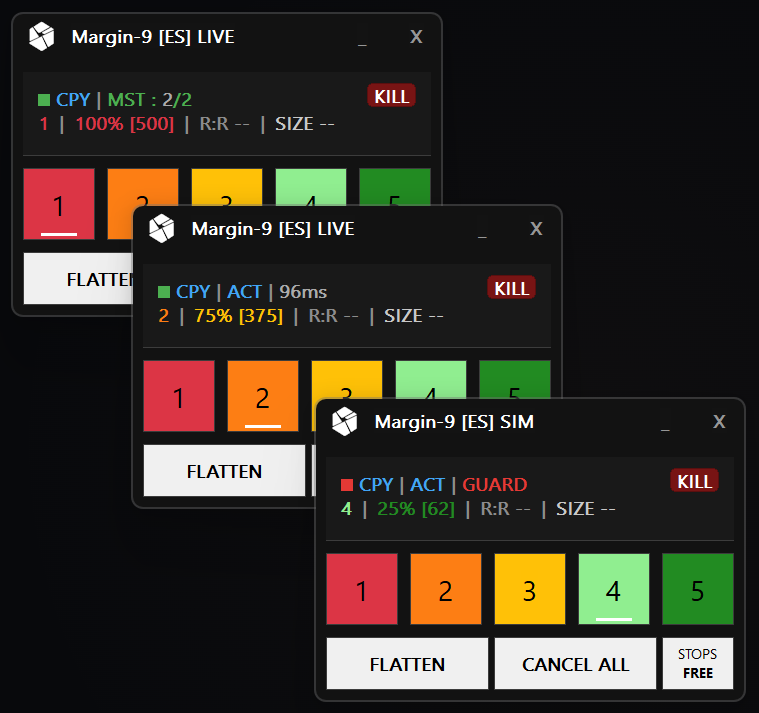
One master, two slaves. The master reports two connected, copying accounts; each slave shows its own risk profile (75% and 25% of its own budget), the latency of the last update, and — bottom — a refused setup because that chart runs in simulation while the master is live.
Concretely, when the master places a setup:
- Each slave takes direction and price levels only. Its own risk profile, its own contract limits and its own volatility cap decide the size. A $500 master and a $150 slave both risk exactly what they are configured to.
- Each slave places its protective stop before its entry — the same order in which Margin-9 protects a local trade — and uses the master's stop and take-profit levels as its own exits.
- If the master fills first (a market entry, or a limit that filled in one queue and not the other), the slave catches up with a market order only while the market is within a configurable number of ticks of the master's price. Otherwise it skips the setup and says so. No chasing a runner.
- Drags on the master move the slave's orders. A cancel on the master cancels them. A flatten on the master flattens them, using the same two-step flatten that protects a manual position.
Guards: refuse rather than guess
The second thing a copier owes you is to refuse anything ambiguous instead of copying it and hoping. A slave in Margin-9 checks every update against four guards, and a mismatch means nothing is placed:
- Symbol — the same contract, including the contract month. (An optional one-pair symbol map covers brokers that name the same contract differently.)
- Tick size and contract size — an ES master can never drive a MES account, because the prices match while the risk is ten times different.
- Simulation vs. live — a simulated master never trades a live account, and a live master never trades a simulated one.
- Account — optionally, only a named master account is accepted; and a master trading the very same account as the slave is always rejected.
The panel shows a refused setup as GUARD, in red, with a hollow connection square. You see it before you wonder why one account is flat.
When the master goes silent
Every copier has a failure mode that nobody tests until it happens: the master chart closes, its study reloads, or the sender simply stops. A copier that keeps whatever it has, with no signal, leaves you to notice. A copier that flattens automatically turns a reload into a market exit.
Margin-9 does neither. Slaves listen for a heartbeat; after a configurable timeout (five seconds by default) they freeze: pending copy entries are cancelled, an open position keeps its stops and targets, the panel turns red with STALE and an alarm sounds. Nothing is flattened. When the master is back, the next setup is copied normally. The master, in turn, sees which slaves are connected and copying — MST : 2/2 — and can stop all of them at once with a KILL button, while keeping its own trade.
Test before you trust it
The safest way to bring a new account into a copy setup is to let it watch first. Margin-9 has a Preview-only role: the slave receives everything, runs every guard, and shows on its panel the size it would trade with its own risk profile — without placing a single order. When the number is what you expect, switch the role to Trade. Do that in simulation first, then in live.
What to look for in a Sierra Chart trade copier
Whichever tool you choose, this is the checklist we would use:
- How is size decided on each receiver? Multiplier, or per-account risk? If it is a multiplier, work through the rounding at your smallest account before you go live.
- Where is the protective stop when the receiver's entry fills? Already working, or copied a moment later?
- What happens on a symbol, tick-size or sim/live mismatch? Refused, or copied?
- What happens when the sender goes silent? Nothing, freeze, or auto-flatten — and do you get told?
- Is there a kill switch on both sides? Closing a chart is not a kill switch.
- Can a receiver still be traded by hand without the copier interfering — and does the copier stay away from your manual trade?
- Can you dry-run a new account and see its size before it places anything?
- Do you need a second tool for sizing, brackets and flatten logic, or is it one study?
The honest limitations
Copy trading in Margin-9 is in beta, and some limits are design decisions rather than roadmap items:
- All charts must run on the same PC. There is no network copy to another machine.
- Master and slaves trade the same contract with the same tick size. There is no micro-to-full-size translation, on purpose.
- Every chart needs its own Margin-9 license activation, and the charts must be open for the copy to work — a study only runs while its chart does.
- Fill prices across accounts can never be guaranteed. Limit entries usually fill at the same level on every account, but market entries and the catch-up chase carry slippage. Margin-9 shows the slippage of each fill against the master's entry on the panel, so at least you know.
- Check your prop firm's rules. Most allow trading your own accounts in parallel; some have clauses on identical fills across accounts. That is between you and the firm.
Setting it up
Five steps, about five minutes:
- On each slave chart, set Role to Slave – Preview only and give it its own port.
- On the master chart, set Role to Master and list the slave ports.
- Check the panel: the master shows how many slaves answered; each slave shows a filled connection square.
- Place a setup on the master and read the size each slave shows for its own account. Adjust its risk profile if needed.
- Switch the slaves to Slave – Trade. Start in simulation.
The full walkthrough, every setting and the panel states are in the copy trading documentation.
Frequently Asked Questions
What is a Sierra Chart trade copier?
A Sierra Chart trade copier is a study that mirrors the trading of one chart (the master or transmitter) to other charts running on the same PC (the slaves or receivers), each on its own trading account. It lets you trade one setup across several accounts — typically multiple prop-firm evaluation or funded accounts — without clicking each order several times.
Does a trade copier work across different prop firms and brokers?
Yes, as long as each account has its own Sierra Chart instance or chart on the same computer. The copier links the charts locally; each chart sends its own orders to its own trading service. The instruments must match — the same contract with the same tick size on every account.
Why is copying with a fixed multiplier a problem?
A multiplier keeps the contract ratio between accounts constant, not the dollar risk. Accounts of different sizes end up risking very different shares of their daily loss limit, small multipliers round to zero or one contract, and if the master trades a fixed contract count every account inherits its inconsistent risk. Sizing each account from its own risk budget fixes all three.
Can I copy an ES trade into a MES account?
With Margin-9 no — by design. ES and MES have identical prices but ten times different tick values, so a price-level copy would carry ten times different risk. Margin-9 checks symbol, tick size and contract size and refuses mismatches instead of copying them. Trade the same contract on every account, and let each account size for itself.
What happens if the master chart closes or the connection drops?
A well-designed copier must not guess. Margin-9 slaves wait for a heartbeat; if it stops, they cancel pending copy entries, keep any open position together with its stops and targets, and raise an alarm. They never flatten on their own, because an automatic market exit on a lost connection would be a worse failure than a protected position.
Copy trading is included in Margin-9 — a risk calibration tool for Sierra Chart that sizes every trade from your stop distance, places the bracket for you, and, since 3.5.0, mirrors the setup to your other accounts. Free 7-day trial, full functionality.
Ready to upgrade your trading?
Discover our professional tools for Sierra Chart.